
How to Get BreezeDoc Webhooks
A webhook tells your app the moment something happens to a document: it's sent, opened, signed, completed, cancelled or expired. BreezeDoc posts a short, signed message to your server, so you don't have to keep checking.
Overview
- Plan: Agency Plan ($49 one-time) or Pro Plan ($10 a month or $99 a year). Webhooks belong to a team, and only the team owner can add them.
- Which documents: documents in that team. Documents under your own account outside the team don't send webhooks.
- Your endpoint: a public HTTPS address on port 443 that accepts POST requests. Up to 10 endpoints per team.
Which Events Can I Get?
document.sent: the document was sent.recipient.viewed: a recipient opened the document.recipient.signed: a recipient finished signing.document.completed: everyone signed and the completed PDF is ready.document.cancelled: the document was cancelled through the API or an AI assistant.document.expired: the document expired before everyone signed.webhook.test: a test you sent yourself.
Each message has the event type, the time and the document ID, plus the recipient for recipient events. It never includes the document's text or what signers typed. To get the signed PDF, use the API. See BreezeDoc API.
How to Add a Webhook
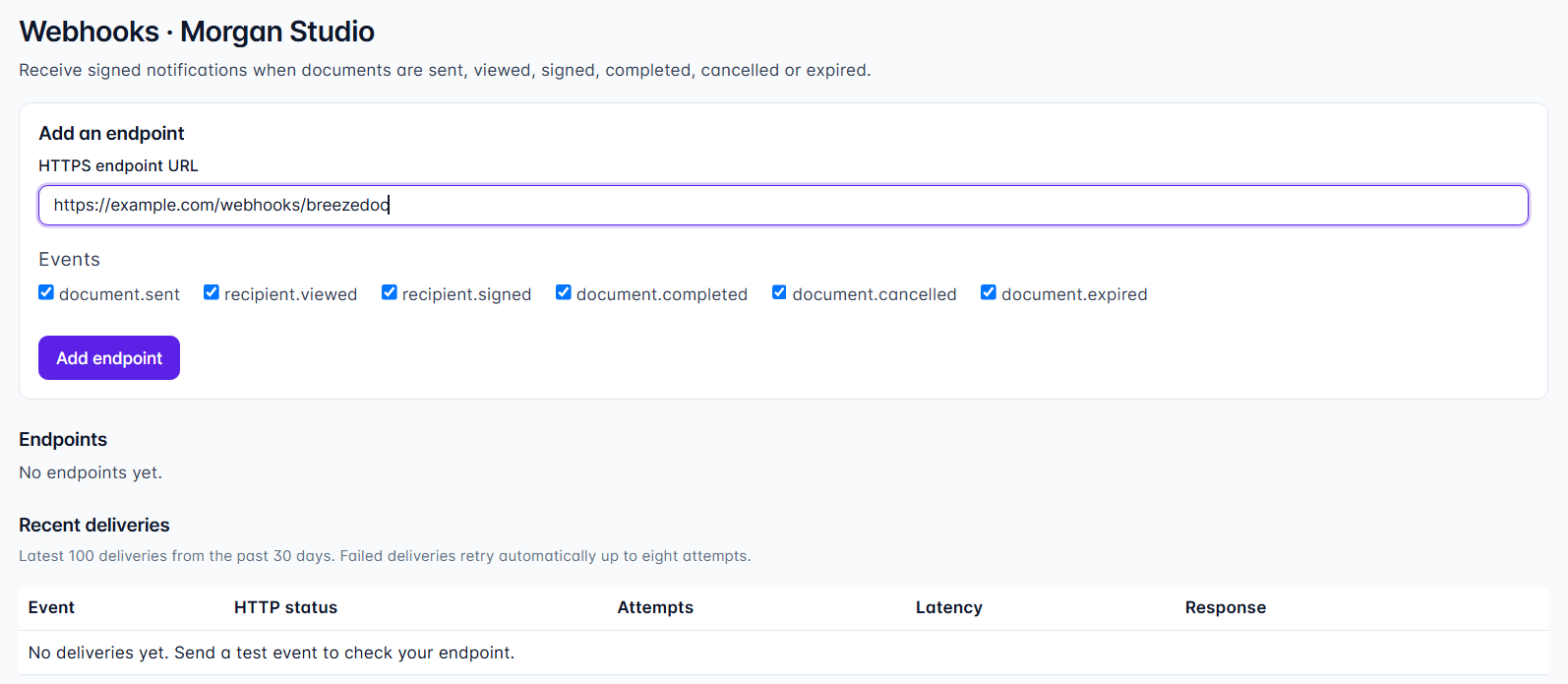
- Open Settings → Integrations, click Manage API Keys, then Manage keys for followed by your team name.
- Click Manage webhooks.
- Under HTTPS endpoint URL, enter your server's address.
- Under Events, untick any events you don't need.
- Click Add endpoint.
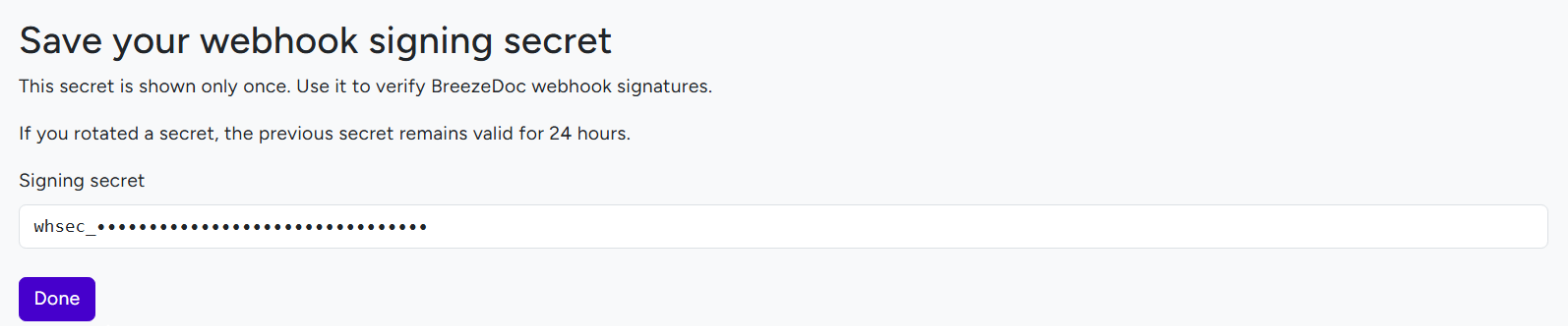
- Copy the Signing secret. It starts with
whsec_and is shown only once. Your server uses it to check that messages really come from BreezeDoc. Then click Done.
How to Test Your Webhook
- On the Webhooks page, click Send test under your endpoint.
- Within about a minute, the test shows under Recent deliveries with your server's HTTP status, how long it took and the start of its reply.
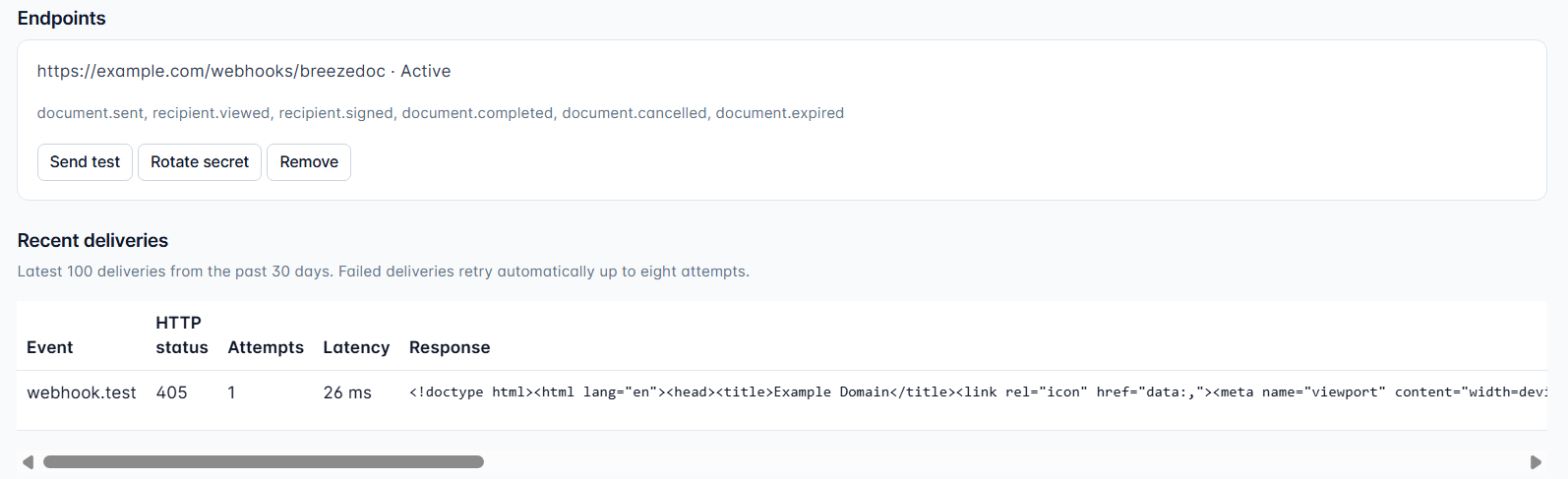
A 2xx status means it worked. Any other status means your server turned it down. In the picture above, the example address replied 405, so BreezeDoc will try again.
How Does My Server Check a Message?
- Every message has a
BreezeDoc-Signatureheader with a timestamp and a signature made with your signing secret. - Check the signature against the raw message before you read it, and reject messages older than five minutes.
- Reply with a 2xx status once you've saved the event.
Ready-made examples in Node.js and Python are at breezedoc.com/developers.
What Happens if My Server Is Down?
- BreezeDoc tries again after 1 minute, 5 minutes, 30 minutes, 2 hours, 6 hours, 12 hours and 24 hours.
- If an endpoint keeps failing for three days, BreezeDoc turns it off and emails the team owner. The endpoint then shows Disabled after delivery failures.
- To retry one message yourself, click Redeliver next to it under Recent deliveries. It keeps the same event ID.
- Recent deliveries shows the last 100 messages from the past 30 days.
The same message can arrive twice, or out of order. Use the event ID to skip messages you have already handled.
How to Change or Remove a Webhook
- Rotate secret: creates a new signing secret. The old one keeps working for 24 hours, so you have time to update your server.
- Remove: deletes the endpoint. BreezeDoc stops sending to it at once.
- To change the address or the events, remove the endpoint and add it again.
Troubleshooting
I don't see Manage webhooks
- Webhooks need a team, and only the team owner sees them. Teams are on the Agency and Pro Plans. Create one under Settings → Teams.
My server gets the test but no document events
- Check that the document is in the team. Documents under your own account outside the team don't send webhooks.
- Check that the event is ticked for that endpoint. The ticked events are listed under the endpoint's address.
My endpoint says Disabled after delivery failures
- Fix your server first, then click Remove and add the endpoint again. You get a new signing secret, so update your server with it.
The signature doesn't match
- Check the signature against the raw message exactly as it arrived, before your app turns it into JSON.
- Make sure your server uses the newest signing secret. After Rotate secret, the old one stops working after 24 hours.
BreezeDoc won't accept my endpoint address
- The address must start with
https://, be reachable from the internet and use the standard port 443. Local addresses such as localhost don't work.
Still stuck? Email support@breezedoc.com with your team name and the event under Recent deliveries (never your signing secret).
Frequently Asked Questions
Does BreezeDoc have webhooks?
Yes. Team owners on the Agency and Pro Plans can add up to 10 webhook endpoints per team.
Can I use webhooks on the Free Plan?
No. Webhooks belong to a team, and teams are on the Agency and Pro Plans.
Do webhooks include the signed document?
No. They include the event, the document ID and the recipient. Use the API to download the signed PDF.
Do I need an API key for webhooks?
No, you can add them on the Webhooks page. You need a team API key only to manage webhooks from your own code.
Need more help? Contact our support team at support@breezedoc.com - we are here to help!