
How to Schedule a Document to Send Later
Schedule a document to go out at a date and time you pick, in your time zone. Every plan can do it, the Free Plan included.
Overview
- Plan: every plan.
- Time zone: the time zone in your account settings. The send page shows it next to the time.
- When: at least 5 minutes from now, and before the document expires. Times go in 15-minute steps.
How to Schedule a Document
- Upload or open your document, add the signer and the fields, and go to the send page.
- Under When to send, choose Schedule for later.
- Pick the date and time from the calendar. Wrong time zone? Click change next to it.
- Click Schedule send.
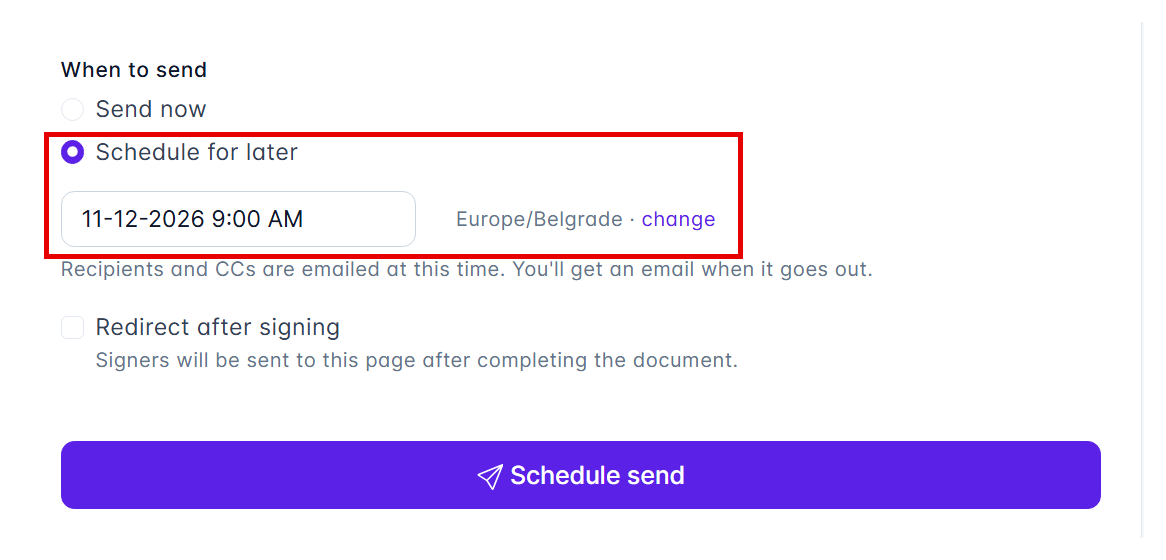
Your signers and CCs are emailed at that time. BreezeDoc also emails you when it goes out.
How to Change or Cancel a Scheduled Document
Scheduled documents show on your Documents page with the send time. Pick Scheduled in the status filter to see only those.

- Send now: sends it right away.
- Reschedule: pick a new time. The custom email and reminders you chose stay as they were.
- Cancel: nothing is sent, and the document goes back to an unsent draft.
What If I Sign First?
If you are on the document before the other signers ("Me"), you sign right away, and the next person is emailed at the time you scheduled. If you haven't signed by then, nothing goes out and BreezeDoc emails you.
Troubleshooting
It went out at the wrong time
- Check Timezone under Settings → Account. Scheduled times use that time zone, not your computer's.
I got an email that it was not sent
- The document expired before the send time, or you were first to sign and hadn't signed yet. The document is back in your documents as unsent, so fix it and send it again.
I can't pick the time I want
- Times go in 15-minute steps (:00, :15, :30, :45) and must be at least 5 minutes away.
Still stuck? Email support@breezedoc.com with the document name.
Frequently Asked Questions
Can I schedule documents on the Free Plan?
Yes. Every plan can schedule documents.
Will I know when it was sent?
Yes. BreezeDoc emails you when a scheduled document goes out, and tells you who it went to.
Can I schedule an uploaded PDF, or only templates?
Both. Any document you send can be scheduled.
Need more help? Contact our support team at support@breezedoc.com - we are here to help!