
How to Connect BreezeDoc to ChatGPT, Claude or Cursor
Connect BreezeDoc to ChatGPT, Claude or Cursor and ask it to find templates, create drafts, send documents and check who has signed. Nothing is sent without your approval.
Overview
- Plan: Agency or Pro. You connect as the owner of a team, and the assistant works with that team's templates and documents.
- Assistants: ChatGPT (on chatgpt.com), Claude (on claude.ai) and Cursor.
- Server URL:
https://breezedoc.com/mcp - Sign-in: OAuth. You don't need an API key, client ID or client secret.
How to Connect ChatGPT
- On chatgpt.com, click Plugins in the left sidebar. It is no longer under Settings.
- Click Add at the top right, then Add custom MCP server.
- Enter the name BreezeDoc, the server URL
https://breezedoc.com/mcp, and choose OAuth. - Tick I understand and want to continue, then click Create as a plugin.
- Click Connect BreezeDoc. Log in to BreezeDoc, choose your team, and approve access.
- Start a new chat, type @, choose BreezeDoc, and ask "Which templates do I have?"
If you don't see Add custom MCP server, your ChatGPT plan or workspace doesn't offer it yet.
Tip: In ChatGPT, open Settings → Plugins → BreezeDoc → Permission and choose Allow read-only tools. ChatGPT then reads your templates and documents without asking, and asks you before it creates or sends anything. With the default setting, ChatGPT may refuse to create drafts.
How to Connect Claude
- On claude.ai, click Customize in the left sidebar, then Connectors. (Settings → Connectors only tells you they have moved to Customize.)
- Click Add, then Add custom connector.
- Enter
https://breezedoc.com/mcpas the connector address, name it BreezeDoc, and save. - Click Connect next to BreezeDoc. Log in to BreezeDoc, choose your team, and approve access.
- In a new chat, ask "Which templates do I have?"
On a Claude Team plan, only an organization owner can add a custom connector. Once an owner adds BreezeDoc, everyone else just clicks Connect.
How to Connect Cursor
- Add this to
.cursor/mcp.jsonin your project, or to~/.cursor/mcp.jsonfor every project:
{"mcpServers":{"breezedoc":{"url":"https://breezedoc.com/mcp"}}} - Connect it from Cursor's MCP settings and finish the sign-in in your browser.
How to Create and Send a Document From a Chat
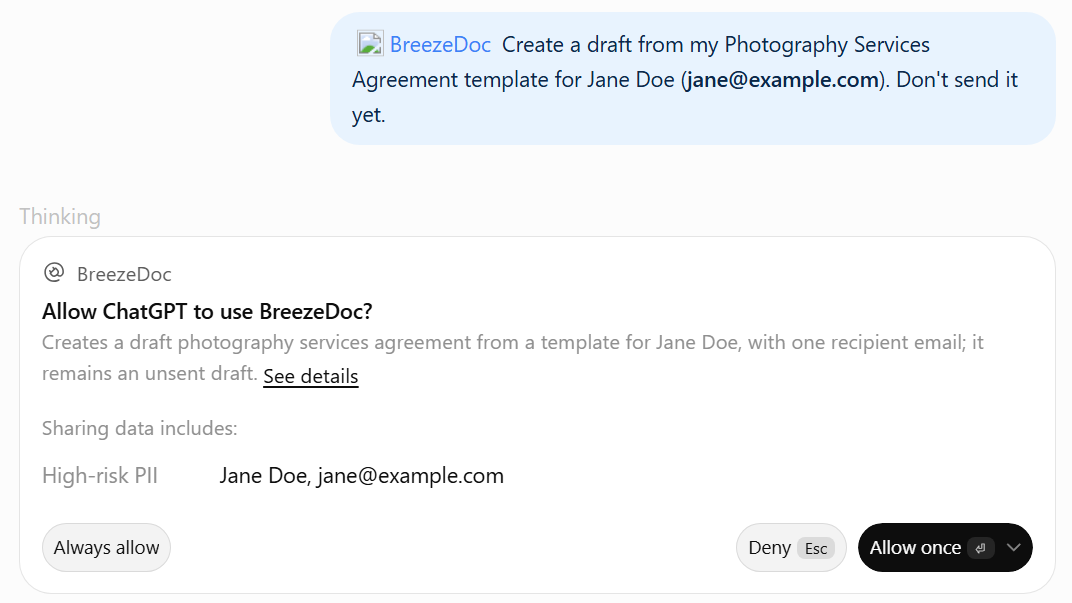
- Ask for a draft, for example: "Create a draft from my Photography Services Agreement template for Jane Doe, jane@example.com. Don't send it yet."
- Your assistant asks for approval before it creates the draft. Click Allow once.
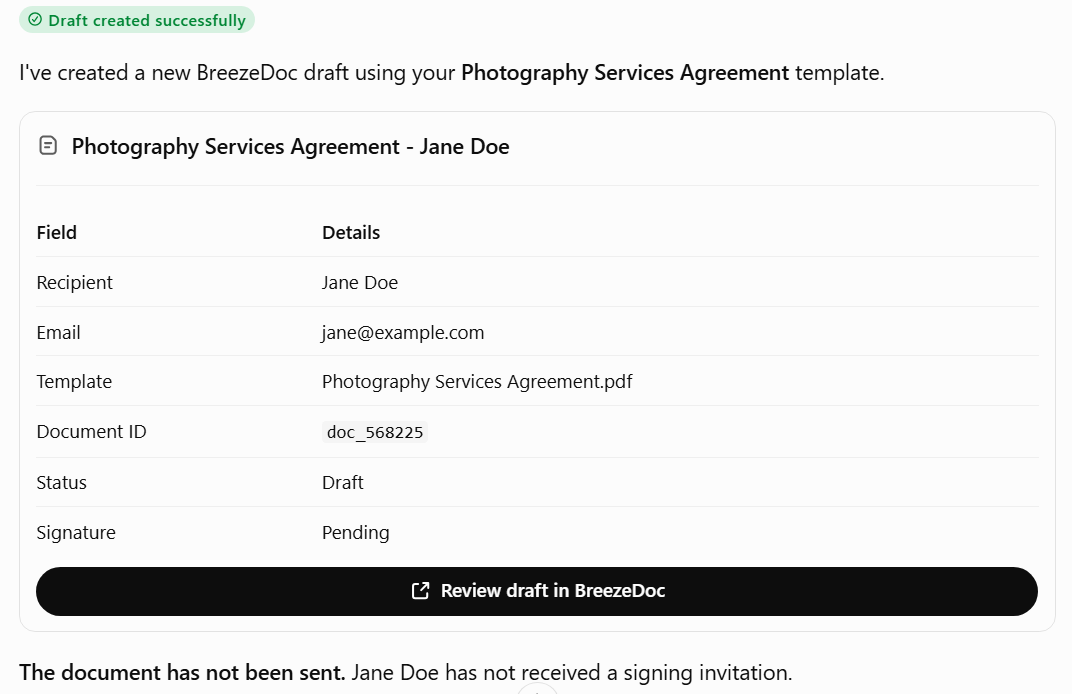
- The draft is created in BreezeDoc and is not sent. Click Review draft in BreezeDoc to check it.
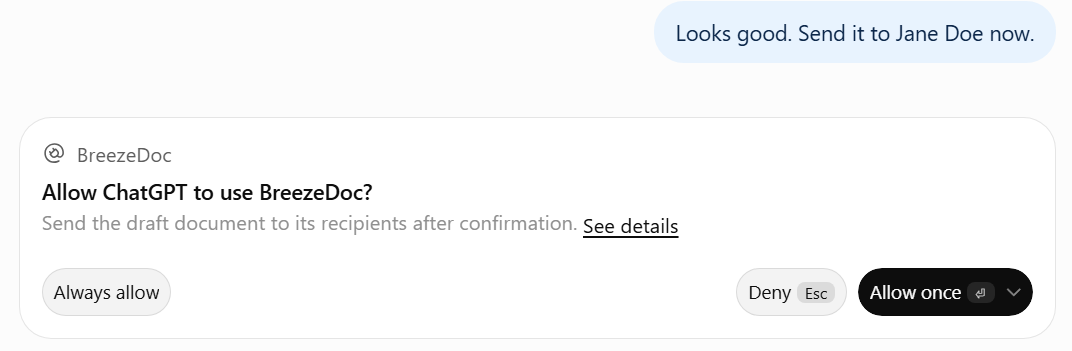
- When it looks right, ask your assistant to send it. It asks for approval again. Click Allow once.
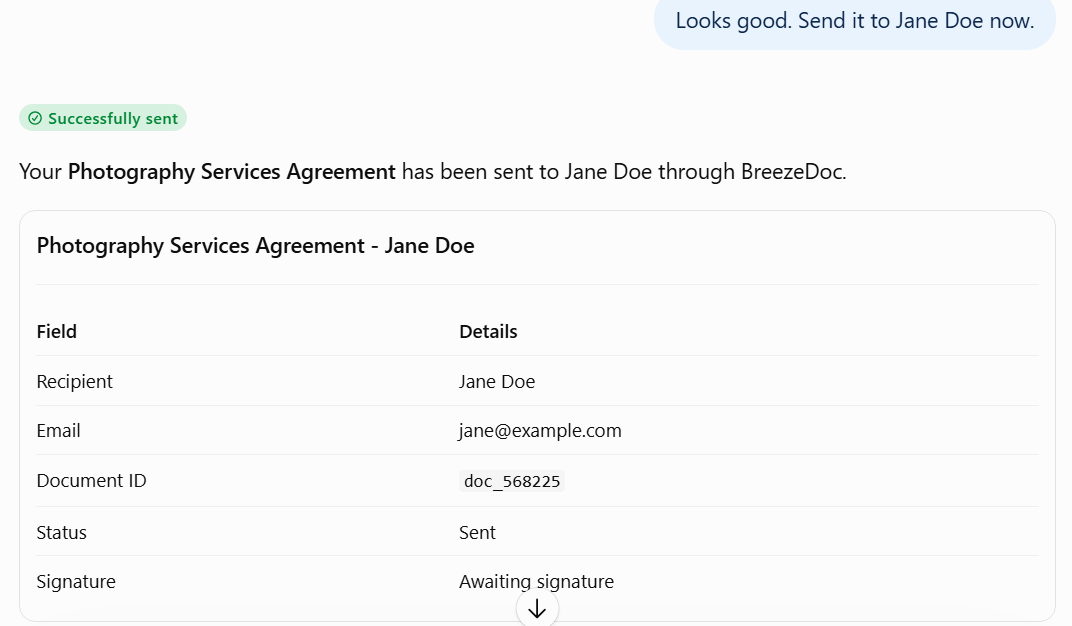
Your signer gets the usual BreezeDoc email, and the document shows Sent.
What Can Your Assistant Do?
- Show your account and team
- List your templates and show a template's details
- Create a draft from a template, a PDF or text
- List your documents and check a document's status
- Send a draft, send a reminder, or cancel a document
- Get a download link for a document
Sending, reminding and cancelling always need your approval. Creating a draft never sends it. Your assistant sees document details such as names, status and signers, not what is written in your documents.
How to Disconnect an Assistant
- In BreezeDoc, open Settings → Integrations → Manage API Keys, then click Connected apps. Or go straight to
breezedoc.com/settings/connected-apps. - Click Revoke access next to the assistant. Access stops at once.

You can also remove BreezeDoc from your assistant's own connector or plugin settings.
Troubleshooting
I can't choose a team when I approve
- You connect as a team owner. Create a team first under Settings → Teams. Teams are on the Agency and Pro Plans.
My assistant says I have no templates
- Your assistant works inside the team you chose. Templates under Your templates aren't part of the team. Add the template under your team's templates.
My assistant says BreezeDoc returned an error when creating a draft
- In ChatGPT, set the BreezeDoc permission to Allow read-only tools (see the tip above), then ask again. You will be asked to approve each change.
I can't find where to add BreezeDoc in ChatGPT
- Open Plugins in ChatGPT's left sidebar and use the Add button at the top right. If Add custom MCP server isn't there, your ChatGPT plan or workspace doesn't offer it yet. In a company workspace, an admin may have turned it off.
Still stuck? Email support@breezedoc.com with the assistant you are using and what it says.
Frequently Asked Questions
Can my assistant send documents without asking me?
No. Sending, reminding and cancelling always ask for your approval first, and creating a draft never sends it.
Can my assistant read what's in my documents?
No. It sees details such as document names, status and signers, not the text of your documents.
Do I need an API key?
No. You sign in to BreezeDoc and approve access. API keys are only for your own code.
Which plans can connect an AI assistant?
Agency and Pro. You connect as the owner of a team.
Need more help? Contact our support team at support@breezedoc.com - we are here to help!