
How to Download Signed Documents and Activity PDFs
Download a document from Documents → More → Download, and its activity log with Download PDF on the Activity page. Downloads are free and unlimited on every plan.
Prerequisites
- Plan: any plan - Free, Individual, or Agency
- Document: any document on your Documents page - signed, in progress, or not sent yet
- Team documents: every team role (Owner, Sender, Editor, Viewer) can download
How Do I Download a Document?
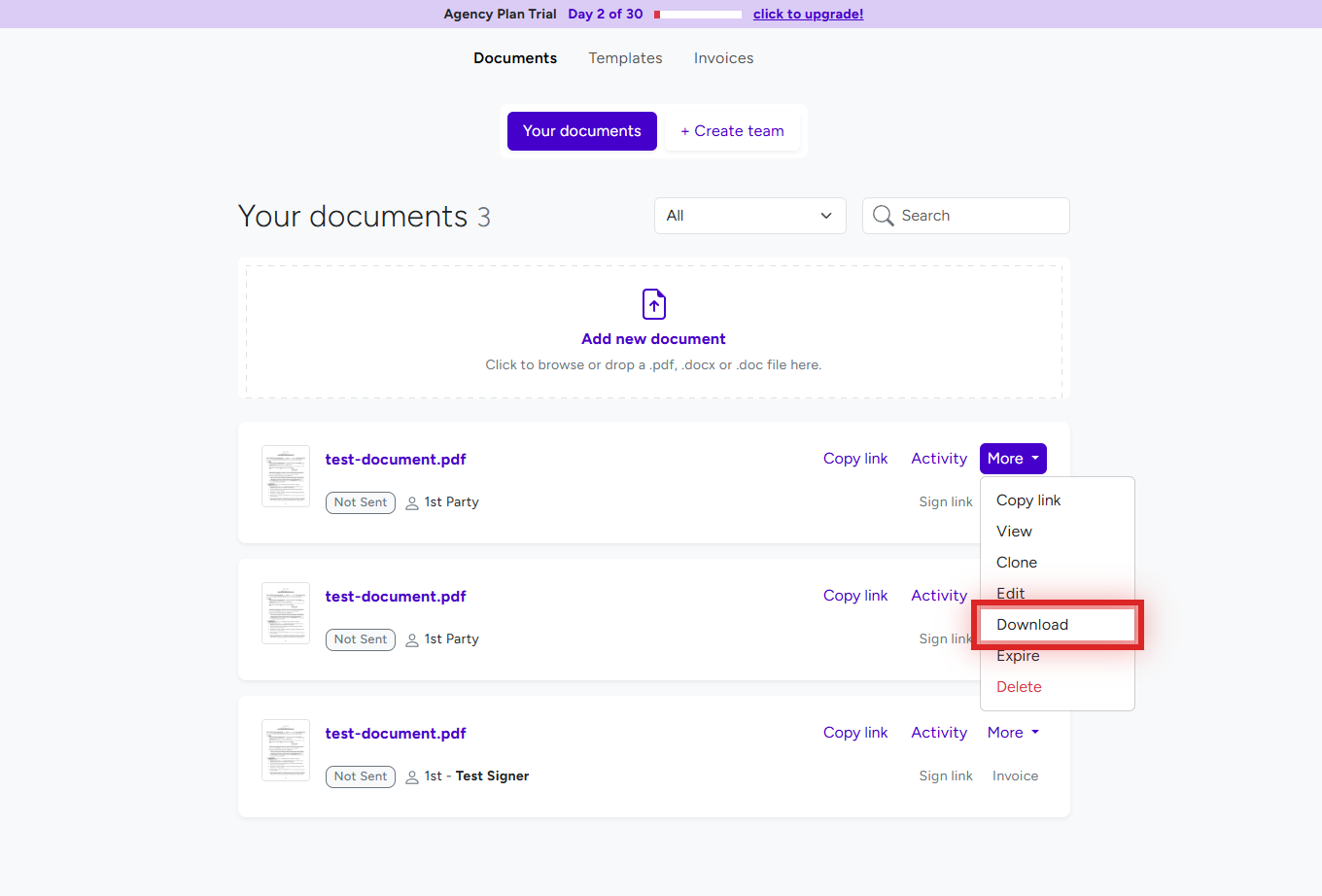
- Click Documents in the top menu.
- Find the document and click More next to it.
- Click Download. The PDF is saved to your browser's downloads folder.
What is in the downloaded PDF?
- Completed documents - the final signed PDF with every signature and filled-in field.
- Documents still being signed - a PDF of the current state: the fields filled in so far, with the rest left empty.
- Branding - on the Free and Individual Plans, each page carries a small BreezeDoc logo at the bottom. Agency Plan documents have none. See Custom Branding.
How are downloaded files named?
The file name is the document name in lowercase with hyphens, for example "Service Agreement" becomes service-agreement.pdf. A completed document ends in -signed.pdf (service-agreement-signed.pdf). To change the name, rename the document in the editor before you download - see Create Your First Document: Upload a File or Use a Template.
How Do I Download the Activity Log?
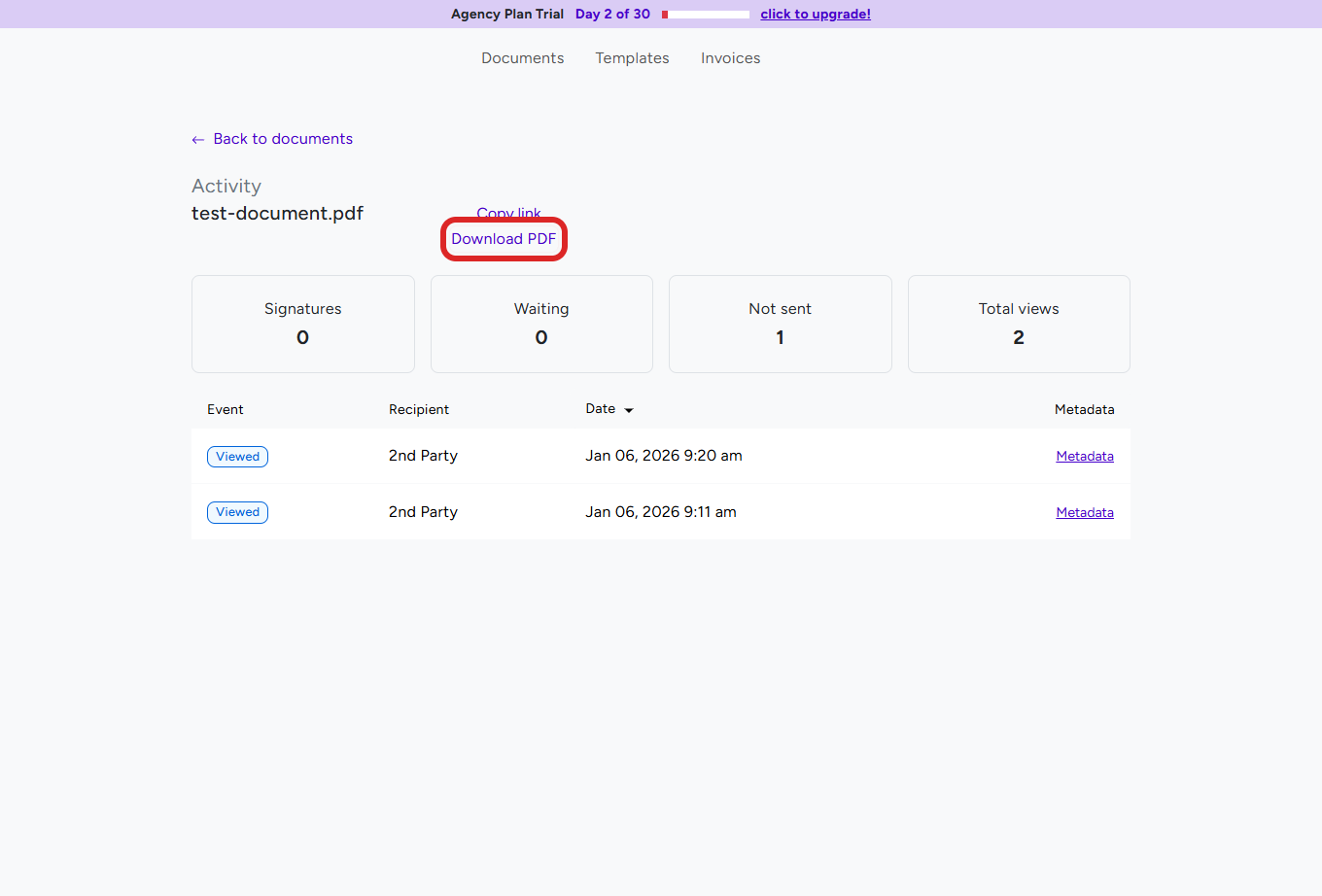
- On Documents, click Activity next to the document.
- Click Download PDF at the top of the Activity page.
The file is named after the document with -activity.pdf at the end. It lists the document's events - when it was sent, viewed, and signed by each party. The events are explained in How to Track Document Activity and Download the Audit Log.
How Do Signers Get Their Copy?
- When the last party signs, every signer receives an email ("You've successfully signed" followed by the document name) with the signed PDF attached.
- You receive "A document has been completed", also with the PDF attached.
- Signers can open the document again later through their signing link, which now shows their confirmation page.
CC recipients get a copy too - see CC Recipients.
Troubleshooting
The downloaded PDF has empty fields
- Not every party has signed yet - the PDF shows the current state. Check who is missing under Activity, then download again once the document is complete.
I cannot find Download
- Open the More menu next to the document on Documents - Download is in that menu.
- For team documents, open the team's tab on Documents first.
I downloaded the activity log instead of the document
- Download PDF on the Activity page is the activity log. For the document itself use More → Download on the Documents list.
I cannot find the downloaded file
- Look in your browser's downloads list or downloads folder, and search for the document name ending in .pdf.
Still stuck? Email support@breezedoc.com with the document name and whether you need the document or the activity log.
Frequently Asked Questions
Can I download documents on the Free Plan?
Yes. Downloading documents and activity logs works on every plan, as often as you like.
Can I download a document before everyone has signed?
Yes. You get a PDF of the current state, with the fields filled in so far.
Is the downloaded PDF locked against editing?
No. BreezeDoc does not password-protect or lock the PDF. The document's history is kept in its activity log, which you can download separately.
Do signers get a copy of the signed document?
Yes. Each signer receives the signed PDF by email when the last party signs.
Need more help? Contact our support team at support@breezedoc.com - we are here to help!